SiriusOne Aster Vault profiles are available through the official Aster DEX interface. Wallet connection, USDC deposit and any Vault allocation are initiated and confirmed by the participant in their own wallet and in Aster.
An allocation is represented by the participant's position in the selected Vault profile. Its value reflects that Vault's trading outcome and can rise or fall, including a substantial or total loss.
SiriusOne does not request or store private keys, and does not take custody of the participant's wallet. The final profile selection, allocation terms, records and confirmations are presented through the Aster Vault interface.
Risk noticeRisk labels are relative only among the three SiriusOne Aster Vault profiles. Crypto futures and Vault allocations can lose most or all of their value. No return, recovery, capital protection, or maximum drawdown is promised. This guide is technical information, not investment advice or a recommendation.
In simple terms:Participant wallet → Aster account → selected SiriusOne Vault profile on Aster → value of the Vault position
Choose an Aster Vault risk profile.
The charts below are illustrative risk-profile sketches only. They are not historical, live, or expected performance data.
If an Aster account already has funds available, the Vault profiles can be reviewed directly in the official Aster interface. If Aster or crypto is new, this step-by-step guide explains how a MetaMask wallet can be prepared, how an Aster account can be funded, and how to continue to a profile selection.
New to Aster? You can use the SiriusOne referral code mykbhi when setting up your account.
START HERE
Your route to a SiriusOne Vault profile.
The complete process is outlined below. A MetaMask wallet is connected, native USDC and a small amount of ETH are prepared on Arbitrum, USDC is deposited into Aster, and a Vault profile is selected in the official Aster interface.
Connect MetaMaskA browser-only wallet connection is requested. No funds are moved.
Prepare funds on the Arbitrum blockchainNative USDC and a small amount of ETH for network fees are required.
Deposit USDC into AsterThe exact token, amount, network and Aster Treasury contract are verified in MetaMask.
Choose a SiriusOne Vault profileThe final profile selection, allocation and terms are confirmed in the official Aster Vault interface.
Connect your MetaMask wallet.
Connect the wallet you want to use on Aster. This is a browser-only connection; no funds move and SiriusOne does not store your wallet address.
If MetaMask is installed in a different browser, open this guide there. Never share a recovery phrase with anyone.
Check your wallet before choosing an amount.
Balances of native USDC and the network token used for gas are checked on Arbitrum, Ethereum and BNB Chain. This is read-only: no signature, network switch or transaction is requested.
Check the wallet to see where USDC and gas are available.
Only native USDC on Arbitrum can use this guide's direct Aster deposit. Funds on another network remain in your wallet; use the official Aster deposit options or bridge them only after reviewing the route.
In MetaMask, choose USDC on Arbitrum. Also keep roughly $5 worth of ETH on Arbitrum as a practical gas buffer; USDC cannot pay the network fee. This is not a fee quote, because network costs can change. Purchase options and verification depend on your region.
Add USDC to MetaMask Tutorial
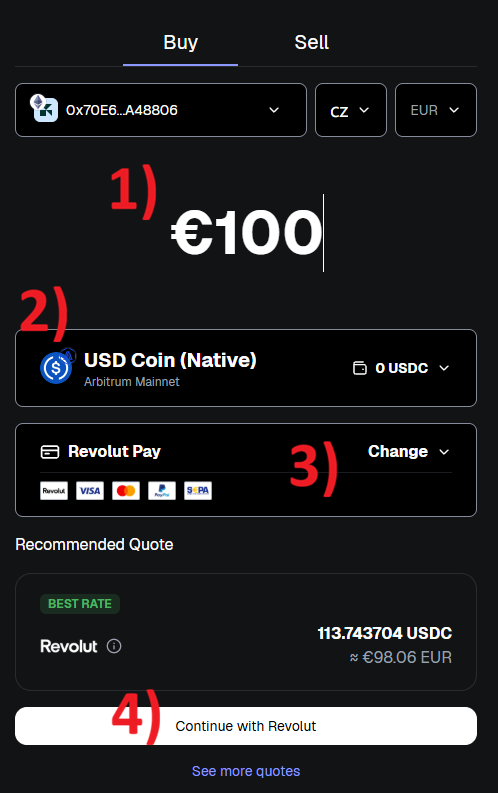
1. Choose the currency you want to use to buy USDC.
2. Native USDC on the Arbitrum network is recommended.
3. Choose your preferred payment method.
4. Review the quote and complete the payment.
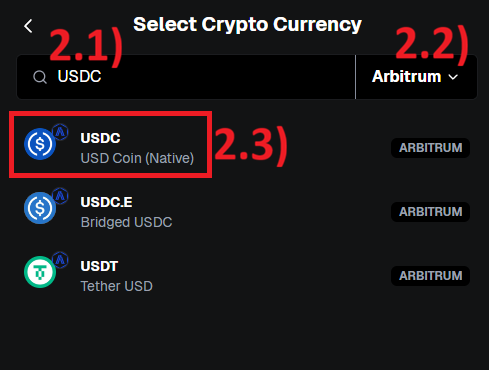
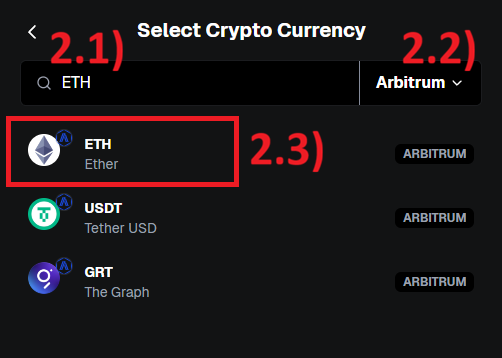
2.1. Search for USDC.
2.2. Select the Arbitrum network.
2.3. Choose USDC - USD Coin (Native), not USDC.e.
Add ETH to MetaMask Tutorial
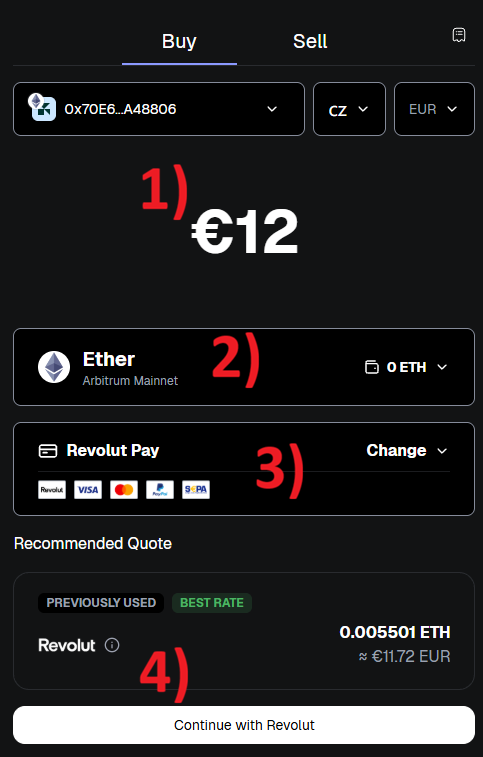
1. You need only a small amount of ETH for network fees. Choose the minimum amount your payment provider allows, for example the minimum Revolut lets you send.
How much USDC would you like to deposit into Aster?
Choose how much native USDC you want to deposit into your Aster account. You can make more than one transfer. This amount stays only in this browser and is used as a reminder in the next steps.
Aster Vault minimum: 100 USDC total on your Aster account
Available native USDC on Arbitrum: 0 USDC
Choose an amount to continue.
FUND YOUR ASTER ACCOUNT
Deposit your chosen amount USDC into Aster.
At this step, the MetaMask wallet, Arbitrum network, exact USDC amount and current Aster deposit configuration are verified. MetaMask then presents the required confirmations.
Deposit amountNot chosen USDC
AssetNative USDC on Arbitrum
DestinationAster Perpetual account
No transaction has been prepared yet.
Aster Treasury contract to verify in MetaMask The official Aster Treasury contract is used for this deposit. For the allowance confirmation, a spending cap of exactly 0 USDC is granted; no USDC is moved at that point. Before either confirmation, native USDC on Arbitrum and this Aster contract must be shown in MetaMask: 0x9e36cb86a159d479ced94fa05036f235ac40e1d5.
Two confirmations may be needed.The exact USDC spending cap is first granted to Aster in MetaMask; the transfer is then confirmed separately. A different token, amount, spender or network must not be approved.
If MetaMask shows an error or you close the page after a transaction was sent, do not send another one. First check the transaction in MetaMask or Arbiscan.
CHOOSE A VAULT PROFILE
Complete your allocation in the official Vault interface.
Choose one SiriusOne Vault profile below, connect the same wallet to Aster, and select Invest. Aster requires at least 100 USDC total in your Aster account for the Vault allocation; this can include the transfer from this guide and USDC already held on Aster. The final amount, risk information, and terms are shown and confirmed there.
Confirm only after reviewing the profile riskThe profile labels are relative only. Every Vault profile can incur substantial drawdowns and total loss. Aster controls the allocation and redemption workflow; its current terms must be reviewed in the official interface before confirmation.
Allow 5-10 minutes after the USDC deposit is confirmedThe balance may take this time to appear in the Aster account. No further deposit should be submitted while it is being processed.

 Aster DEX interface. Wallet connection, USDC deposit and any Vault allocation are initiated and confirmed by the participant in their own wallet and in Aster.